Digital Evidence
NDG Digital Evidence: Collection, Acquisition & Preservation
NDG Digital Evidence: Collection, Acquisition & Preservation builds working proficiency in handling digital evidence from scene arrival to laboratory intake. Learners identify storage media at a scene, apply legal seizure authority, acquire write-blocked forensic images, verify integrity with cryptographic hashes, and keep chain-of-custody records through packaging, transport, storage, and intake. Later chapters cover live and volatile data acquisition and the handling decisions specific to mobile, IoT, video, and cloud-connected devices. The course follows NDG Digital Forensics: From Evidence to Courtroom and assumes that course or equivalent knowledge.
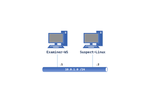
All NETLAB+ supported labs for this course use the NDG Digital Evidence v1.0 Pod: a Debian forensic examiner workstation and a separate Linux suspect machine that serves as the live-acquisition target.
The course content is included with the labs, so no textbook is required: 12 chapters with quizzes and 20 labs. The 10 guided labs give step-by-step instructions and progressive hints; the 10 applied labs give the same scenarios as high-level tasks, with no hints, graded on completion. Chapters and labs are delivered through our HTML5 content viewer as Interactive Content, with integrated questions and instant feedback within the lab environment. To take advantage of the Interactive Content, keep your NETLAB+ system up to date with the latest version.
Course Content
| Chapter | Title |
|---|---|
| Chapter 01 | The Digital Evidence Technician: Role, Standards & Scene Management |
| Chapter 02 | Legal Authority for Search & Seizure |
| Chapter 03 | Storage Media & Device Identification |
| Chapter 04 | Write Blocking & Forensic Soundness |
| Chapter 05 | Forensic Imaging |
| Chapter 06 | Hashing & Integrity Verification |
| Chapter 07 | Packaging, Labeling & Transport |
| Chapter 08 | Chain of Custody Documentation |
| Chapter 09 | Evidence Storage & Lab Intake |
| Chapter 10 | Live & Volatile Data Acquisition |
| Chapter 11 | Mobile, IoT, Video & Cloud Evidence Handling |
| Chapter 12 | Comprehensive Review & Evidence-Handling Case Simulation |
Supported Labs
| Lab | Title |
|---|---|
| Guided Lab 01 | The Digital Evidence Technician: Role, Standards & Scene Management |
| Guided Lab 03 | Storage Media & Device Identification |
| Guided Lab 04 | Write Blocking & Forensic Soundness |
| Guided Lab 05 | Forensic Imaging |
| Guided Lab 06 | Hashing & Integrity Verification |
| Guided Lab 07 | Packaging, Labeling & Transport |
| Guided Lab 08 | Chain of Custody Documentation |
| Guided Lab 09 | Evidence Storage & Lab Intake |
| Guided Lab 10 | Live & Volatile Data Acquisition |
| Guided Lab 11 | Mobile, IoT, Video & Cloud Evidence Handling |
| Applied Lab 01 | The Digital Evidence Technician: Role, Standards & Scene Management |
| Applied Lab 03 | Storage Media & Device Identification |
| Applied Lab 04 | Write Blocking & Forensic Soundness |
| Applied Lab 05 | Forensic Imaging |
| Applied Lab 06 | Hashing & Integrity Verification |
| Applied Lab 07 | Packaging, Labeling & Transport |
| Applied Lab 08 | Chain of Custody Documentation |
| Applied Lab 09 | Evidence Storage & Lab Intake |
| Applied Lab 10 | Live & Volatile Data Acquisition |
| Applied Lab 11 | Mobile, IoT, Video & Cloud Evidence Handling |
Enabling the Labs
To enable the labs, install the NDG - Digital Evidence - Collection, Acquisition & Preservation (DF-201) course using the Course Manager. See the Course Manager section of the NETLAB+ VE Administrator Guide for details. The course content will then be available to be added to classes.
Using the Labs
Always select the correct lab exercise for the lab being performed. Students or teams should schedule the correct lab exercise from the catalog. NETLAB+ will only show those labs for which the required pod type is available. A lab that works on different pod types may appear more than once if your system is so equipped. Instructors should select the correct lab from the Exercise tab during instructor-led lab reservations. This can be done as many times as needed during the reservation.