Setup and Management (VE 9)
Proxmox VE 9: Setup and Management
Gain hands-on experience with powerful open-source enterprise server solutions with Proxmox VE 9: Setup and Management labs. Learn how to install and configure Proxmox VE, deploy and modify virtual machines and containers, and understand storage and backup solutions
Learn more about the Proxmox Virtual Environment product, you may refer to their official website: https://www.proxmox.com/en/proxmox-virtual-environment/overview
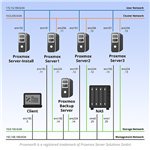
All NETLAB+ supported Proxmox VE 9: Setup and Management labs use the Proxmox VE 9: Setup and Management Pod.
NDG's Proxmox VE 9: Setup and Management labs feature our Interactive Content experience, delivered through our HTML5 content viewer. You'll have access to a wealth of resources within the lab environment, including: Lab Exercises, Videos, Assessments and Grading, Integrated Questions with Instant Feedback, and Challenge Labs. To take advantage of the Interactive Content, keep your NETLAB+ system up to date with the latest version.
Supported Labs
| Lab Number | Title |
|---|---|
| 1 | Accessing the Lab Environment |
| 2 | Installing Proxmox VE |
| 3 | Basic Setup and Configuration |
| 4 | Users, Groups and Permissions |
| 5A | Deploying Virtual Machines |
| 5B | Deploying a Container |
| 6 | Modifying Virtual Machines and Containers |
| 7 | Cloning and Templates |
| 8 | Local Storage |
| 9 | Networked Storage |
| 10 | Backup and Redundancy Solutions |
| 11 | Proxmox Backup Server |
| 12 | Networks |
| 13 | Command Line Interface (CLI) |
| 14 | Clustering and High Availability |
| 15 | Challenge Lab |
| Assessment 01 | Introduction to Proxmox VE |
| Assessment 02 | Proxmox VE Subscriptions and Repositories |
| Assessment 03 | Proxmox VE Installation |
| Assessment 04 | Proxmox VE GUI Navigation |
| Assessment 05 | Proxmox VE Virtual Storage |
| Assessment 06 | Proxmox VE Virtual Networking |
| Assessment 07 | Proxmox VE User, Virtual Machine and Container Management |
| Assessment 08 | Proxmox VE Backup Server Configuration |
| Assessment 09 | Proxmox VE Clusters |
Enabling the Labs
To enable the labs in NETLAB+, install the Proxmox VE 9: Setup and Management course using the Course Manager. See the Course Manager section of the NETLAB+ VE Administrator Guide for details.
Using the Labs
Always select the correct lab exercise for the lab being performed. Students or teams should schedule the correct lab exercise from the catalog. NETLAB+ will only show those labs for which the required pod type is available. A lab that works on different pod types may appear more than once if your system is so equipped. Instructors should select the correct lab from the Exercise tab during instructor-led lab reservations. This can be done as many times as needed during the reservation.