Overview
All NETLAB+ topologies with lab switches and Virtual Machines
require additional switch configuration tasks for successful operation.
If you have recently installed a pod and it is failing with a control switch error,
please be certain that the commands below are manually configured on each
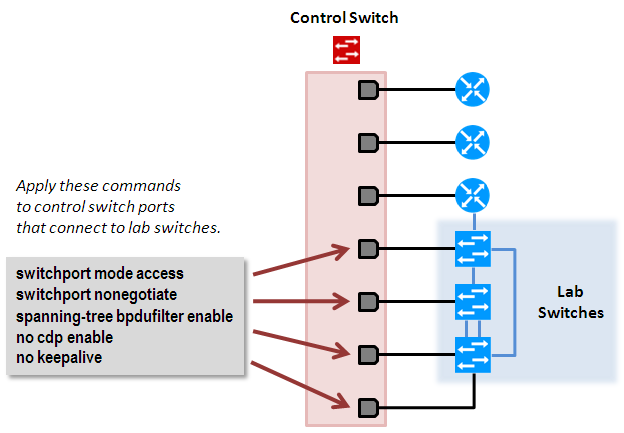
control switch port which connects to a lab switch.
Topologies
Topologies with control switch ports requiring additional switch configuration commands include
those listed in the table below.
| Topology |
Control Switch Ports |
| Multi-Device Pod (MDP) |
S1,S2 |
| Multi-purpose Academy Pod (MAP) |
S1,S2,S3 |
| Network Fundamentals Pod (NFP) |
S1 |
| Cuatro Switch Pod (CSP) |
ALS1, ALS2, DLS1, DLS2 |
| LAN Switching Pod (LSP) |
S1,S2,S3 |
| Basic Switch Pod Version 2 (BSPv2) |
S1, S2 |
| Basic Switch Pod Version 1 (BSPv1) |
S1, S2 |
Symptoms
Your system may experience one or more of the following undesirable symptoms when
the configuration commands listed in the procedure below are missing from the control
ports connected to lab switches.
-
During the pod test you receive the following error: SNMP set request to switch
failed, (noSuchName) There is no such variable name in this MIB.
A pod test may not always catch this error. Depending on the state of the
equipment at the time of a pod test, this error may be flagged in some
pod tests, but not in others.
-
The control switch exhibits excessive network traffic (lights on solid), CPU
activity, or unresponsiveness to IOS commands.
-
Control devices and VMware servers connected to control switches
become completely unreachable. This may be reported in the NETLAB+ log as
cdmon reachability errors.
-
The control switch MAC address appears in a lab switch MAC address table.
-
The spanning tree from the control switch mixes with the spanning tree on the lab switch.
-
The lab switch lists the control switch as a CDP neighbor.
Procedure
Using Hyperterm or other terminal, connect to the console port of the
control switch to which the pod is connected.
The following passwords are used on the control switch.
Console Login Password: router
Enable Secret Password: cisco
Please do not change the passwords – they are used for NETLAB+ automation and technical support.
Each control switch should be running IOS 12.2.25 or later.
Earlier versions may have defects that affect NETLAB+
There are several essential commands that must be manually
configured on each control switch port that connects to a lab switch.
-
switchport mode access
-
Prevents the link from becoming a trunk port.
-
The labs will not work as designed if the link between
control switch and lab switch is trunking.
-
Trunking on ports that should be access ports, combined
with BPDU filtering, creates loops that are not prevented by spanning-tree.
-
switchport nonegotiate
-
Prevents the interface from sending DTP messages.
-
Disabling DTP messages is not critical, but will hide the control switch's
MAC address from lab switches when users performing commands to see the CAM table.
-
spanning-tree bpdufilter enable
-
Instructs control switch port not to send and receive
spanning tree BPDU frames to and from the lab switch.
-
Spanning tree in the lab must not mingle with spanning tree on the control
switch. This would cause several undesirable effects in both the lab and on
the control switches.
-
no cdp enable
-
Disabling CDP is not critical, but will hide the control switch from lab
switch users performing CDP commands.
-
no keepalive
-
Prevents the interface from sending L2 keepalive messages.
-
Disabling L2 keepalives messages is not critical, but will hide
the control switch's MAC address from lab switches when users performing
commands to see the CAM table.
Return to support >
