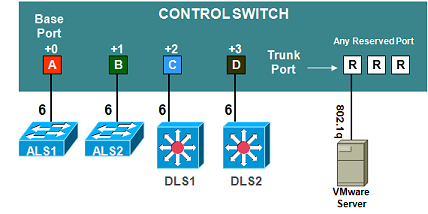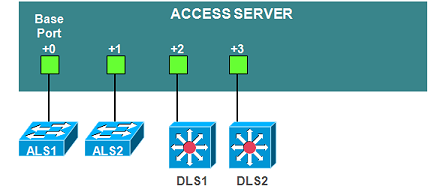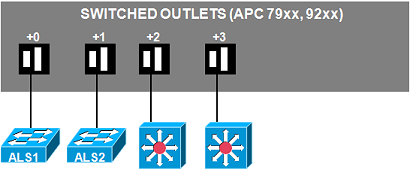
This quick reference page provides a summary of the specifications of this topology. For a complete reference including installation details, please refer to the Cuatro Switch Pod Planning and Installation Guide
For installation details specific to NETLAB+ VE, please refer to the NETLAB+ VE Real Equipment Pod Management Guide
| Topology | Supports | Documentation |
|---|---|---|
|
Planning and Installation Guide |
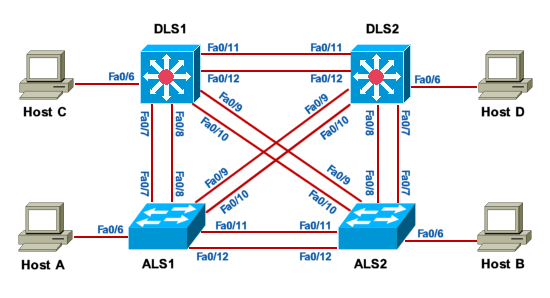
The Cuatro Switch Pod includes four (4) switches. The table below shows the recommended switches based on the official CCNP 5.0 equipment list (available on Academy Connection). Other equipment may work if it is supported by NETLAB+ and can meet the minimum requirements for feature sets, interfaces, IOS, RAM, and Flash
All NETLAB+ topologies with lab switches and Virtual Machines require additional switch configuration tasks for successful operation. The Cuatro Switch Pod requires switch configuration commands on control switch ports ALS1, ALS2, DLS1 and DLS2.
To simplify equipment purchasing, we have organized equipment requirements by pod type. Since these requirements change over time, we further categorized as Configuration A, Configuration B, Configuration C, etc... Equipment lists for each configuration are provided below, with the most recent configuration listed first.
The table below indicates the labs supported for each of the Cisco courses, for each of the topology configurations.
| Cisco Course | CSP A |
|---|---|
| CCNP SWITCH v7.0 | ALL |
| CCNP SWITCH v6.0 | ALL |
NETLAB Versions: NETLAB+ VE, NETLAB AE/PE
| Qty | Product Number | Description | Software | Version | Device Names |
|---|---|---|---|---|---|
| 2 | WS-C2960+24TC-L | Catalyst 2960 24 10/100 + 2 1000BT LAN Base Image | LAN BASE | c2960-lanbasek9-mz.150-2.SE7.bin | ALS1, ALS2 |
| 2 | WS-C3650-24TS-E | Cisco Catalyst 3650 24 Port Data 4x1G Uplink IP Services | IP Services | cat3k_caa-universalk9.SPA.03.06.05.E.152-2.E5.bin | DLS1,DLS2 |
| 12 | 1-foot Cat5e Cable (crossover) | ||||
| 4 | 6-foot Cat5e Cable (crossover) |
Remote PCs are implemented by integrating with 3rd party virtualization products. The NETLAB+ documentation library includes several guides with extensive detail on the implementation of virtualization with your NETLAB+ system.
The following operating system choices are typical based on the curriculum. These choices are not mandatory; you can make substitutions provided that:
Only virtual machines are supported on this topology. Standalone PCs are not supported.
| Virtual Machine | Recommended O/S |
Functions | VLAN Offset1 |
|---|---|---|---|
| Host A | Windows XP | Student PC, client activities | +0 |
| Host B | Windows XP | Student PC, client activities | +1 |
| Host C | Windows XP | Student PC, client activities | +2 |
| Host D | Windows XP | Student PC, client activities | +3 |
1See the planning and installation guide for detaiils
Control devices provide internal connectivity, console access, and managed power. Control devices are dynamically managed by NETLAB+ and are not accessible or configurable by end users.
| Control Device Resource | Quantity Required |
|---|---|
| Control Switch | 4 Consecutive Ports |
| Access Server | 4 Lines |
| Switched Outlet Devices | 4 Outlets |